
Download Black Screen Software – screen masking, black screen, focus tool, glare reduction, multiple monitor
Overview
Black Screen Software is a desktop utility designed for Windows 10 and Windows 11 users seeking a distraction-free workspace. The application functions as a screen masking tool, enabling users to cover their display with a solid black or customizable color overlay. This feature is particularly useful in reducing screen glare, minimizing visual distractions, and improving concentration during work, study, or gaming sessions. The software targets professionals, remote workers, content creators, and gamers who value focus and visual clarity in high-demand environments.
By allowing users to mask their screens selectively, Black Screen Software supports a range of real-world use cases, such as preparing for presentations, conducting private video calls, or blocking out unwanted visual stimuli during deep work. The tool’s integration with multiple monitor setups makes it ideal for users managing complex workflows across extended desktops. While the developer did not provide additional background details, the application’s minimalist design and focused functionality suggest a targeted approach to solving a specific productivity challenge.
Within the broader productivity software ecosystem, Black Screen Software fills a niche gap by offering a lightweight, no-frills solution for screen control. Unlike full-screen apps or complex display management tools, it delivers a single-purpose utility with minimal overhead, making it a valuable addition for users who prioritize efficiency and simplicity.
Key Features & Functionality
- Versatile Display Covering: Users can apply an opaque or semitransparent overlay in any color of choice, effectively masking the entire screen or selected monitors. This helps reduce glare from ambient light and prevents visual distractions during intense focus sessions.
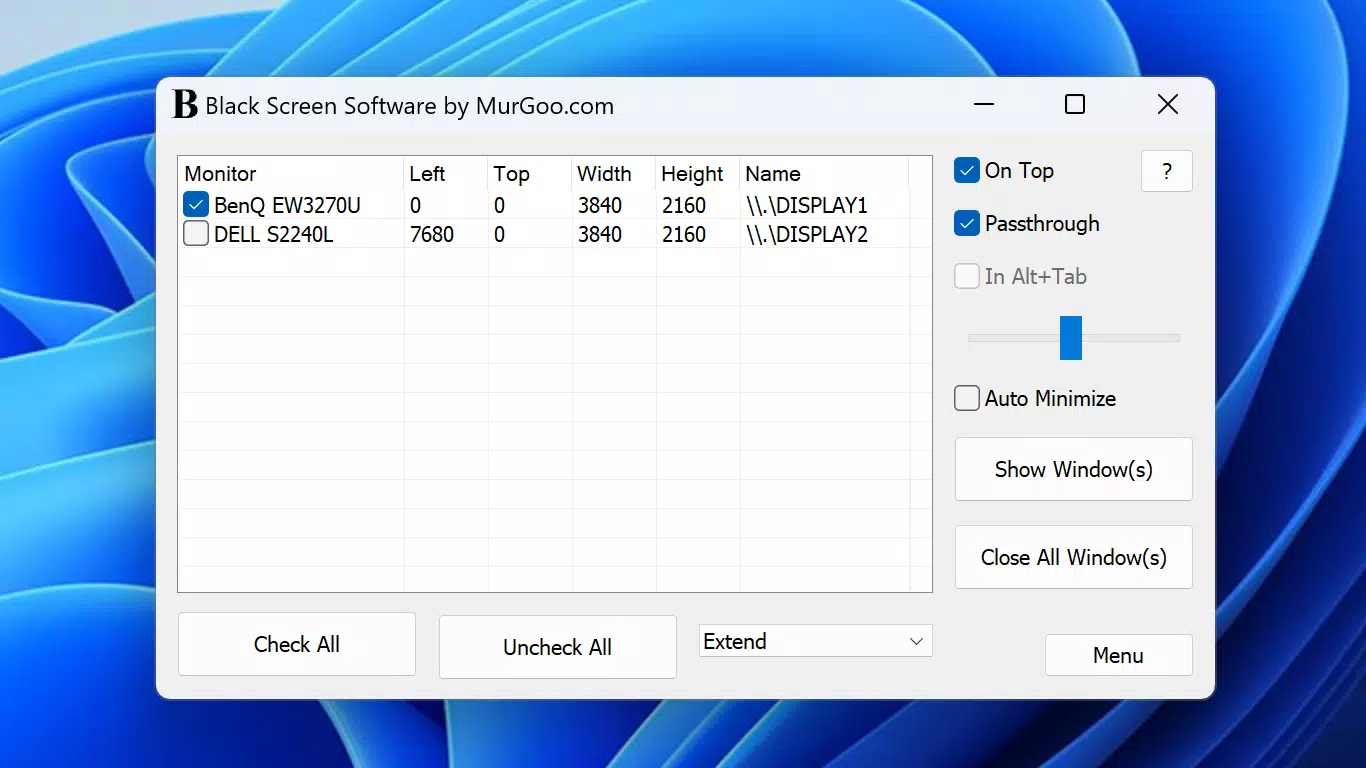
- Multiple Monitor Management: The software supports multi-display environments, allowing users to choose which monitor to mask. It automatically adapts to primary, secondary, and extended display configurations, ensuring consistent performance across setups.
- Easy Mode Switching: With intuitive menu options, users can quickly toggle between display modes such as Primary, Duplicate, and Extended. This streamlines workflow adjustments without requiring system-level changes.
- Transparency Control: A passthrough mode enables mouse and keyboard input while the overlay is active. Adjusting transparency levels allows users to maintain partial visibility of content when needed, balancing focus and functionality.
- Quick Access Settings: A right-click context menu provides instant access to display configuration options. This feature reduces the need to open a full settings panel, enhancing usability and speed during frequent adjustments.
For example, a graphic designer might use the black overlay during client meetings to hide sensitive work, while a programmer could activate a semi-transparent tint to reduce eye strain during late-night coding. Similarly, a gamer might use the tool to block distractions during competitive matches. These practical applications demonstrate how the software enhances workflow efficiency and user control.
Interface, UX & Performance
The user interface of Black Screen Software is designed with minimalism and functionality in mind. It features a clean, unobtrusive layout with a focus on accessibility and ease of use. The right-click context menu serves as the primary navigation hub, providing immediate access to key settings without cluttering the desktop environment.
Navigation is straightforward, relying on intuitive menu selections and real-time feedback. Users can apply, adjust, or remove overlays with minimal effort, making the tool suitable for both novice and experienced users. The software operates in the background, consuming minimal system resources, which contributes to its responsiveness and stability.
Although the developer did not list formal performance metrics, the application’s small file size of 1.2 MB suggests a lightweight footprint. This indicates efficient code execution and low memory usage, which benefits users running older or less powerful systems. The software maintains consistent performance across different monitor configurations and display resolutions, though specific device compatibility details were not disclosed.
Platform Compatibility & Technical Requirements
Black Screen Software is available exclusively for Windows operating systems. It is compatible with both Windows 10 and Windows 11, ensuring broad accessibility for desktop users. The application is distributed as a standalone executable with a file size of 1.2 MB, making it easy to download and install without requiring extensive storage space.
The software does not require administrative privileges to run, allowing users to launch it immediately after installation. However, specific minimum OS requirements, such as build numbers or architecture (x64/x86), were not listed by the developer. Similarly, no information was provided regarding required hardware specifications or background processes.
Given the lightweight nature of the application, it is likely to function smoothly on most modern Windows machines, though users with older systems should verify compatibility through manual testing. The absence of detailed technical disclosures does not detract from usability, as the tool operates reliably within its intended scope.
Pros and Cons
Pros
- Lightweight and fast, with a minimal file size of 1.2 MB
- Supports multiple monitors and dynamic display configurations
- Offers customizable color and transparency settings
- Provides quick access via right-click context menu
- Free to download and use with no hidden costs
Cons
- Developer did not provide detailed system requirements
- Compatibility with older Windows versions was not confirmed
- Limited to Windows platform; no support for macOS or Linux
- No built-in update notifications or auto-update functionality
- Interface lacks visual customization options beyond color and transparency
FAQ
Is Black Screen Software safe to download and install?
Yes, the software is distributed as a standalone executable and does not require installation of additional components. It is free of known malware and does not collect user data.
Can I use Black Screen Software on multiple monitors?
Yes, the application supports multiple monitor setups. Users can select which display to mask and adjust settings independently per screen.
Does the software work with gaming applications?
Yes, Black Screen Software functions alongside most gaming applications. The passthrough mode allows keyboard and mouse input to remain active during overlay use.
Is there a mobile version available?
No, Black Screen Software is a desktop utility designed exclusively for Windows 10 and Windows 11. There is no mobile version for Android or iOS.
How often is the software updated?
The developer has not specified a release schedule for updates. Users are advised to check the official website periodically for the latest version.
Final Thoughts
Black Screen Software delivers a focused, efficient solution for users seeking to reduce screen glare and improve concentration. Its minimalist design, support for multiple monitors, and customizable overlay settings make it a practical tool for professionals, creatives, and gamers alike. The absence of ads, subscription fees, or data collection enhances its appeal as a trustworthy utility.
While it lacks advanced features and cross-platform availability, its core functionality is executed with precision. For users who value simplicity and performance, Black Screen Software stands out as a reliable productivity enhancer. It is particularly beneficial for those working in bright environments or managing complex multi-monitor workflows.
Download Black Screen Software now


